Hide the notch.
Tame the menu bar.
dNotch paints a black bar behind your menu bar so the notch melts into it, on any wallpaper. Then it tidies your icons, puts live widgets beside the notch, and lets a small cat move in.
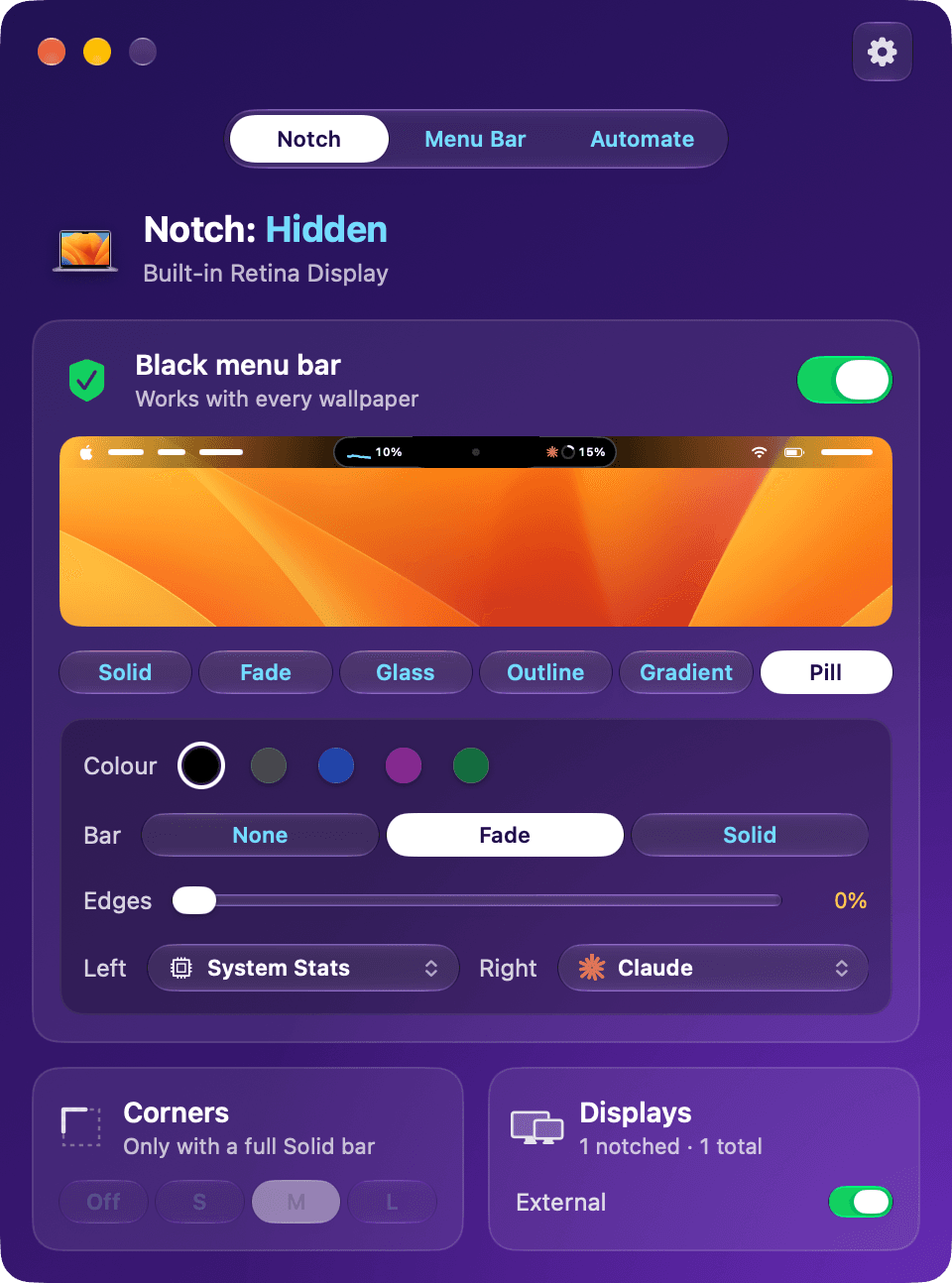
Pill: a capsule round the notch, with a widget each side. That's a cat.
Gone, on every wallpaper.
dNotch doesn't touch your wallpaper. It draws a black, click-through bar just under the menu bar, on every Space, so dynamic and Aerial wallpapers keep working. Make it yours: six styles, three shapes, any colour.
White icons, even on a bright wallpaper.
Over the bar, macOS draws your menus and icons light. Every colour and gradient is dark enough to keep them crisp. Outline, and a Pill with no bar, leave the wallpaper showing, so there icons follow it as usual.
A capsule that fits what's there.
Split wraps your menus in one capsule and your icons in another. When an app adds or removes an icon, the capsule slides to fit. Icons parked behind the notch don't stretch it.
Under your icons, never over them.
The bar sits beneath the menu bar and lets every click through. Icons, their menus and badges work exactly as before, with nothing drawn on top.
The notch, put to work.
Pill wraps the notch in a black capsule and gives each side a widget. Hover one and its panel drops down. When an app's menus get long, Claude, Codex and Cursor shrink to their rings, anything else tucks into the notch, and it all comes back when there's room.
Hover a widget in the bar, or pick one, to see its panel.
Also, there's a cat.
Put a cat in the Pill and a small 3D tabby moves in beside the notch. It naps, stretches, rolls over and wanders about, and when it's awake it bats the menu bar icon next to the pill. Put a cat on each side and they visit, chase and play-fight. Click one and it does something new.


Every icon in its place. Or out of sight.
A notch leaves little room for menu bar icons, and macOS quietly hides the ones that don't fit. dNotch lets you decide what stays, what hides, and how to get it back.
- Shown, Hidden and Always hiddenDrag apps between rows, or reorder them, and your menu bar follows. No ⌘-dragging in the bar.
- Rescued from behind the notchIcons that won't fit beside the notch move to Hidden, where you can reach them, instead of vanishing.
- Menus come firstWhen an app's menus need the room, icons step aside, and they come back once there's space.
- Your real iconsdNotch shows pictures of your actual menu bar icons, and keeps the list up to date as apps come and go.
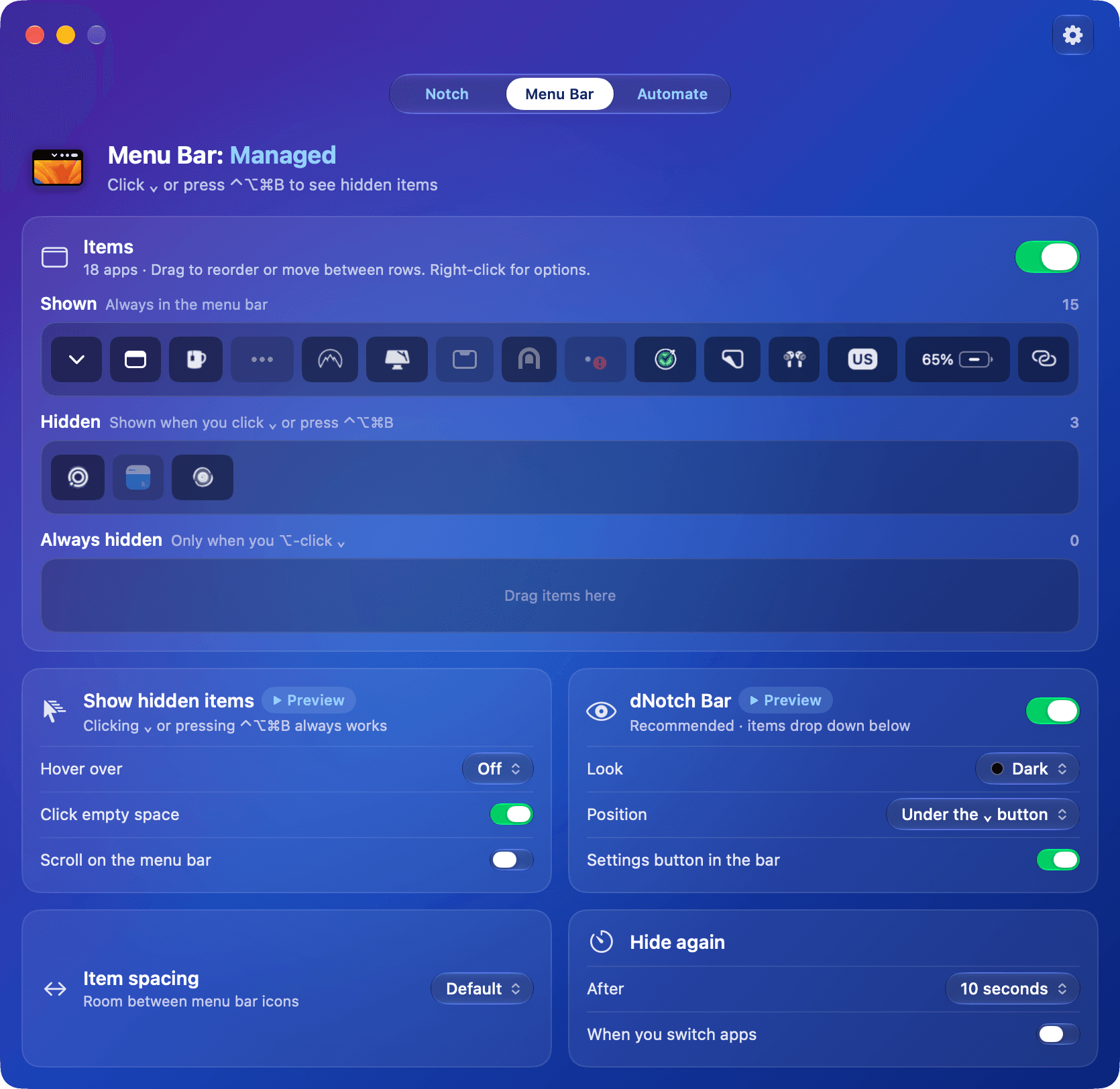
Hidden items drop down in their own bar.
Under the ⌄ button, under the notch or wherever your pointer is. Click one and its menu opens right there. Dark, Glass or Gradient.
However you like to reach.
Room for more.
Tighten the gaps between icons to fit more beside the notch.
No Screen Recording required.
Without it you'll see app icons. Allow it whenever you like for pictures of the real menu bar icons.
Tidies up after itself.
Hidden items fold away after a few seconds, or as soon as you switch apps. Never while you're using one.
Any menu bar item, a few keys away.
Press ⌃⌥⌘Space and type a few letters. Return opens that item's menu, even when it's hidden. Switch profiles and run actions from the same place, without touching the mouse.
Your menu bar, on autopilot.
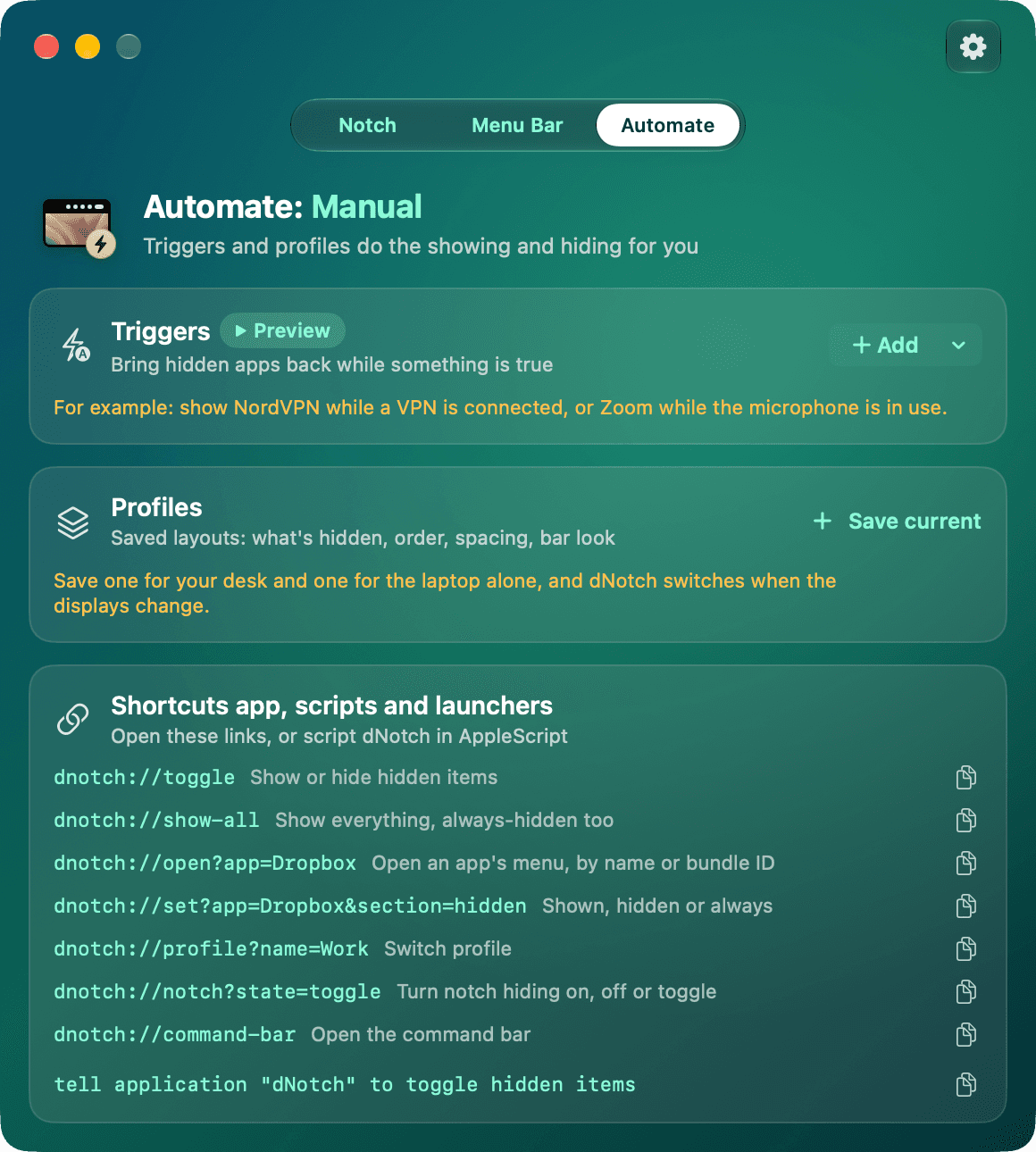
Triggers bring apps back when they matter, profiles switch when your displays change, and everything can be scripted.
Show an app while something is true.
Your VPN while it's connected, your call app while the mic is on. Hidden again the moment it isn't.
One setup for the desk, one for the road.
A profile saves what's shown and hidden, the order, spacing and the bar's look. dNotch switches when your displays change, or when you press its shortcut.
The same menu bar on every Mac.
Profiles are backed up to iCloud Drive, or any folder Dropbox or Google Drive keeps in sync. With Pro, your Macs stay in step.
Links and AppleScript for everything.
Drive dNotch from Shortcuts, Raycast, Alfred or Terminal.
# Shortcuts, launchers and Terminal
open "dnotch://toggle"
open "dnotch://profile?name=Work"
open "dnotch://open?app=Dropbox"
open "dnotch://notch?state=toggle"

# AppleScript
tell application "dNotch" to toggle hidden items
Short clips, straight from the app.
The same demos dNotch shows next to each setting, so you know what a switch does before you flip it.
Feels at home on your Mac.
Liquid Glass controls, a colour for every tab, a live preview of the bar on your own wallpaper, and a welcome guide that explains each permission before macOS asks.
And the small things.
Choose how you pay.
Every feature is in both plans, with your settings backed up to the cloud. Buy it once, or go Pro for a second Mac and every update.
dNotch
Pay once, keep it forever.
- One-time payment
- One year of updates
- 1 Mac
- Cloud backup
dNotch Pro
That's €1 a month. Cancel anytime.
- Pay monthly or yearly
- Always up to date
- 2 Macs
- Cloud backup & sync
Not sure yet? Download dNotch and try everything free for 14 days. No card needed.
Prices include VAT. Businesses can enter a VAT number at checkout to have it taken off. Payments are handled by Paddle. dNotch needs macOS 14 or later. Refund policy
Questions, answered.
What do I need to run dNotch?
A Mac with macOS 14 Sonoma or later, Apple silicon or Intel. Hiding the notch is made for MacBooks with one, and the bar styles, the Pill and the menu bar tools work on external displays too.
Does it change my wallpaper?
No. dNotch draws a black, click-through bar just under the menu bar instead. Your wallpaper and files are never touched, so dynamic and Aerial wallpapers keep working, on every Space.
Which permissions does it ask for?
Accessibility, only if you turn on menu bar management, so dNotch can find and open menu bar items. Screen Recording is optional: with it you see pictures of your real icons, without it you see app icons. Location, Calendar and control of Spotify or Music are asked for only when you turn on the widget or trigger that needs them.
Is there a free trial?
Yes. Download dNotch and use everything free for 14 days, no card needed. When the trial ends, pick a plan to keep going.
What's the difference between the two plans?
Both include every feature, including cloud backup of your settings. The one-time purchase covers one Mac and a year of updates. Pro covers 2 Macs, keeps them in sync, and keeps you on the latest version for as long as you subscribe, paid monthly or yearly.
What happens after my year of updates?
dNotch keeps working, for good, on every version released during your year. If you want the newer versions after that, switch to Pro.
What happens if I cancel Pro?
You can cancel anytime from your receipt email, and Pro stays active until the end of the month or year you've paid for. After that, dNotch needs a license again: renew Pro, or buy the one-time version.
How do I move dNotch to a new Mac?
Sign in to your account with the email you bought with and remove the old Mac. Then activate dNotch on the new one.
What does Cloud backup & sync cover?
Your profiles: which apps are shown or hidden, their order, the spacing and the bar's look. They're saved to iCloud Drive, or any folder that Dropbox, Google Drive or another service keeps in sync, so they come back after a reinstall or on a new Mac. With Pro, both your Macs share them.
Can I get a refund?
Yes. If dNotch isn't right for you, ask within 30 days of buying and you get your money back in full. See the refund policy.
Is tax included in the price?
In the EU, the UK and most other countries, yes: the price you see is the price you pay. In the US and Canada, sales tax is added at checkout. Businesses can enter a VAT number at checkout to have VAT taken off.
Can I use it alongside Bartender or another menu bar manager?
The notch styles and the Pill work alongside anything. For hiding icons, run one manager at a time: two of them fight over the same icons, so quit the other one while dNotch manages the menu bar. dNotch warns you if Bartender is running.
Make the notch disappear.
A black bar, a tidy menu bar, widgets beside the notch, and a cat. All in one small app.